makeithackin
Root Access SAO
Couldn't load pickup availability
Root Access SAO
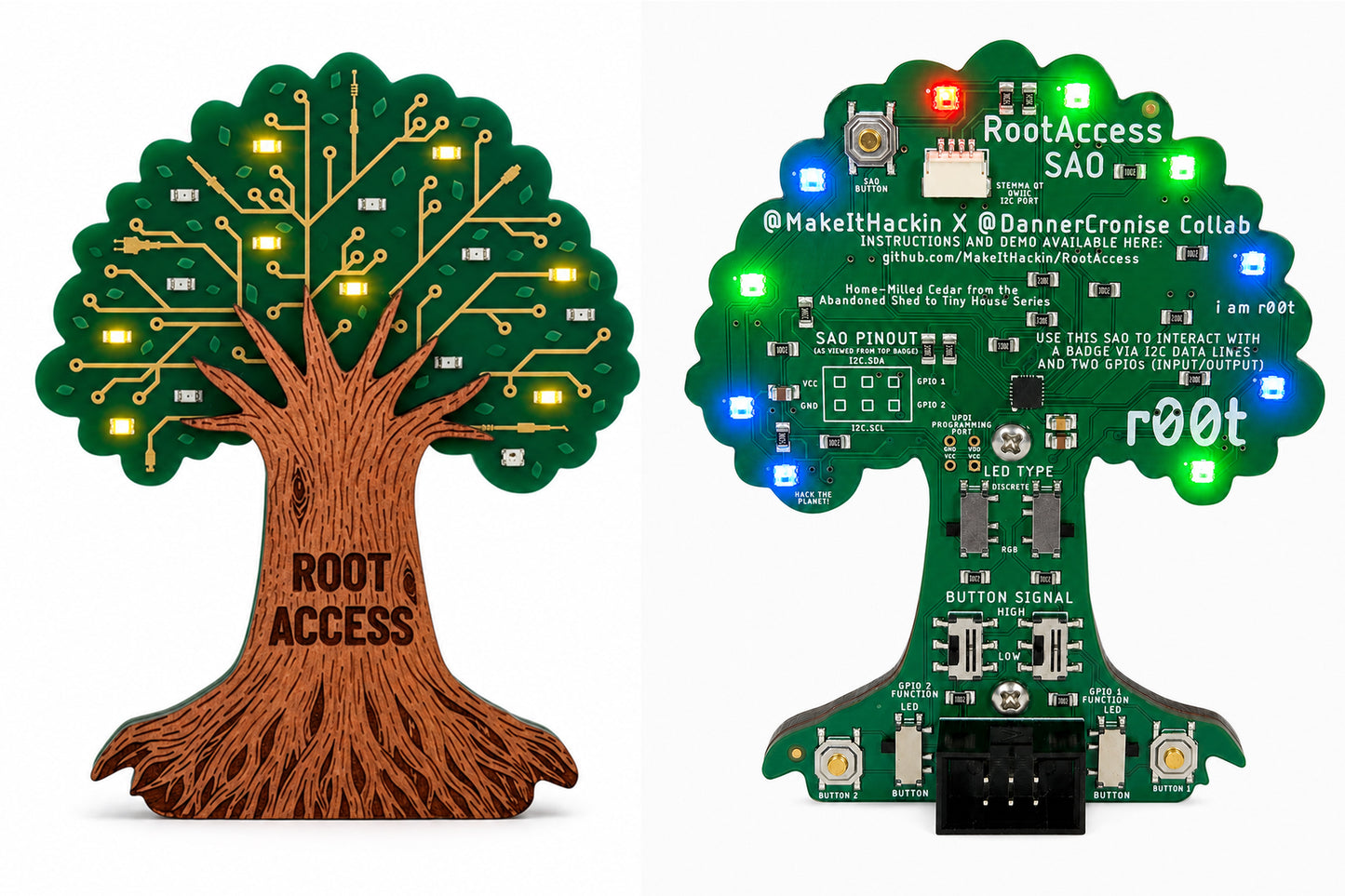
A 10-NeoPixel, 11-LED add-on on home-milled Tennessee cedar. Runs 50 animations on its own — and hands full root access to your host over I2C.
Built for the DEF CON 34 badge. Works with any badge that has a standard SAO header.
Full protocol reference: https://github.com/MakeItHackin/RootAccess
It runs itself
Plug it in and it goes. 50 built-in animations — Knight Rider scan, Matrix Rain, Tesla Coil Arc Storm, candle flicker, a live binary counter — across 10 individually addressable RGB pixels and 11 discrete LEDs (4 of them PWM-dimmable).
One button does everything: tap to cycle animations, hold ~700 ms to turn the LEDs off, hold ~3 s to save the current animation as your boot favorite. Three white blinks confirm the save.
Your favorite and last-played mode live in the ATtiny1616's non-volatile USERROW, so they survive power loss and firmware re-flashing.
…but you can take it over
I2C address 0x50 over the SAO header, no host library required:
Write 0-49       → run that animation
Write 50         → all off
0xFD + 11 bytes  → set all 11 discrete LEDs (0-255 each)
0xFC + 30 bytes  → set all 10 pixels (R, G, B)
Read 2 bytes     → last mode processed + accepted/rejected
No register preamble, no config registers, no handshake. You write bytes, the LEDs do exactly that. A malformed command is rejected whole — no partial writes, no corrupted state, the board keeps doing what it was doing. And the button never stops working: anyone can tap it and pull the board back to a built-in animation.
Talks to anything with an I2C bus — your badge, Arduino, ESP32, Raspberry Pi, Linux i2c-dev. No code at all if you have a Flipper Zero: the I2C Tools app can send commands and read status by hand.
A separate circuit for badge hacking
Nobody knows what DEF CON 34's badge will do with its GPIO lines yet, so Root Access covers every option. GPIO 1 and GPIO 2 each run to their own hardware — own switches, own LEDs, own button — completely separate from the animation engine. Two slide switches per line:
LED (output) — your badge drives the line. Both LED types are live at once, so the badge decides: send a WS2812 stream and the NeoPixel reacts (chained from the badge's own pixels), or send a plain high/low and the discrete LED turns on or off.
Button (input) — that line's dedicated button signals your badge. Pick idle-low/press-high or idle-high/press-low to match your firmware instead of rewriting your firmware to match the hardware.
The two lines are independent — run one as an output and the other as an input. Neither side can disturb the other: GPIO button presses don't touch the animations, and I2C doesn't touch the GPIO lines.
All six header pins are also broken out to labeled solder pads, front and back, for connectors, a logic analyzer, or your own I2C device on the same bus.
Cedar from the farm
The wood isn't a veneer or a laser-cut kit part. It's cedar grown on one of the creators' farm in Tennessee, milled at home, then paired with the PCB by hand. Grain and color vary board to board, so no two are quite the same. Homegrown hardware, literally.
Specs
| MCU | ATtiny1616 |
| Interface | Standard 6-pin SAO header, notch-keyed |
| I2C |
0x50, 100 kHz validated |
| Pixels | 10 addressable RGB |
| Discrete LEDs | 11 total, 4 PWM-dimmable |
| Animations | 50 built-in |
| GPIO | 2 lines, independent, LED-out or button-in |
| Storage | USERROW — survives re-flashing |